---
title: Hawkeye Climate Monitor & Logger (CM-1)
description: "Here you will find the Manual for the Hawkeye and\nHere you will find the Tech Sheet for the Hawkeye"
---
[Skip to content](https://kb.trolmaster.com/hc/en-us/articles/20444347411357-hawkeye-climate-monitor-logger-cm-1#main-content)
[.svg)](https://www.trolmaster.com)
- Start
- Produkte
- Preise
- Blog
- Unternehmen
Open main navigation
Close main navigation
- Start
- Produkte
- Preise
- Blog
- Unternehmen
- [Contact us](https://rircy.share.hsforms.com/22CCHPVdFQBCsAtrt14vkjw)
[Contact us](https://rircy.share.hsforms.com/22CCHPVdFQBCsAtrt14vkjw)
TrolMaster Help Center
- There are no suggestions because the search field is empty.
1. [Trolmaster Help Center](https://kb.trolmaster.com/?hsLang=en)
2. [TrolMaster Controllers](https://kb.trolmaster.com/trolmaster-controllers?hsLang=en)
3. [Single Task Controllers](https://kb.trolmaster.com/trolmaster-controllers?hsLang=en#single-task-controllers)
# Hawkeye Climate Monitor & Logger (CM-1)
CM-1 **Cut Sheet**
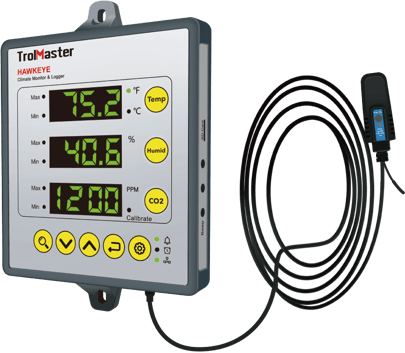
**Features**
3-in-1 REMOTE SENSOR
MICRO-SD CARD DATA LOGGING EXCEED SETTING RANGE ALARM SMARTPHONE APP ACCESSIBILITY
**Overview**
The Hawkeye from TrolMaster provides an economical and accurate method to monitor an enclosed space. Some users simply need to monitor the temperature, humidity and CO2 and VPD levels without the need to actually control any devices. The CM-1 / Hawkeye is designed specically to be used as a back-up monitoring system to ensure environmental conditions stay within acceptable limits. The Hawkeye comes COMPLETE with everything you will need to measure temperature, humidity, CO2 and also provides an accurate VPD measurement. (Vapor Pressure Decit) The user can select the minimum and maximum allowable (limits) for temperature, humidity and CO2 levels. If those limits are exceeded, the Hawkeye will notify the user via the TrolMaster APP as well as by audible and visual alerts displayed on the LED digital display. The Hawkeye is a stand-alone monitoring system that can be used with or without an internet connection. However, once the EM-1 is connected to the internet, it will begin to automatically record and display trends and data from the sensors on an easy-to-read graph within the TrolMaster APP. Local storage of all recorded data can also be recalled from the unit when a MicroSD card is inserted into the Hawkeye.
### **Product Specifications**
****
**Package Content**
1 x Climate Monitor & Logger
1 x SA-S81 Sensor
1 x DC Adaptor
**Input Voltage**
100~240 VAC, 50/60Hz
**Max Input Current**
0.6A
**Max Output Voltage/Current**
24VDC/0.5A
**Temperature Range**
0-59.0°C
**Temperature Accuracy**
±0.20°C
**Humidity Range**
5-95% rH
**Humidity Accuracy**
±7%
**CO2 Range**
0-2000 PPM
**CO2 Accuracy**
±30 PPM
**Working Environments**
Temperature 0-50°C, Humidity=90%
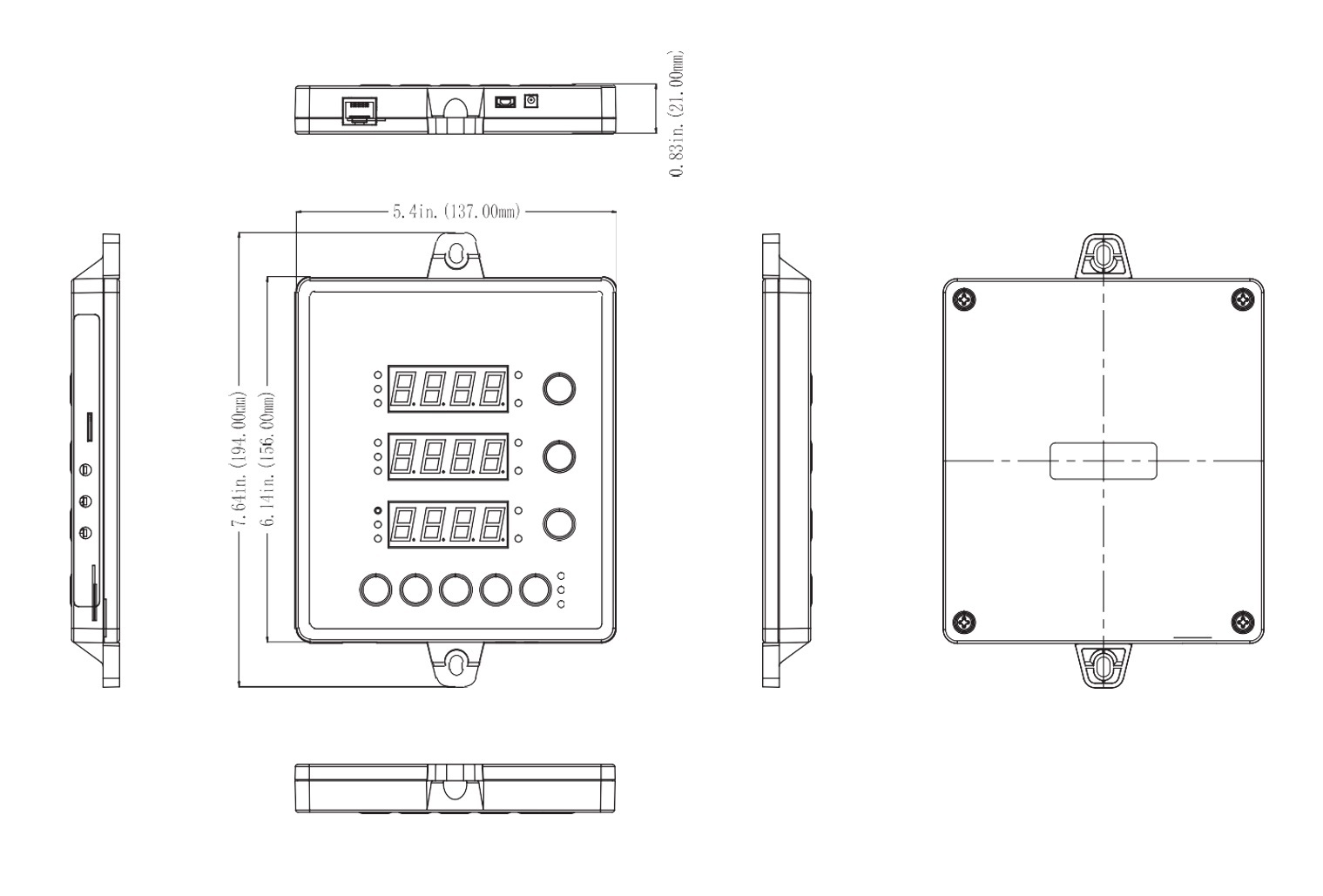
**Package Dimensions**
275mm(L) x 165mm(W ) x 70mm(H)
**User Manual**
****
### **GETTING STARTED **
Thank you for purchasing the TrolMaster HAWKEYE Climate Monitor & Logger. This unit is a simple and affordable way to monitor your grow room. To ensure safety, please read this instruction manual carefully before installation and follow the instructions herein. lt wil provide detailed instructions and guidelines that will help to set up the unit, and to understand the full capability of this unit. Any use or application of this product, other than for its original intended purposes are prohibited. Store this manual in a secure place for future reference.
### **OVERVIEW **
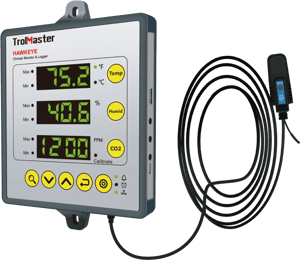
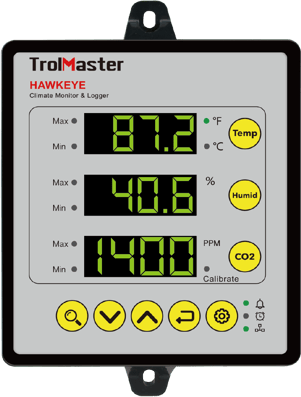
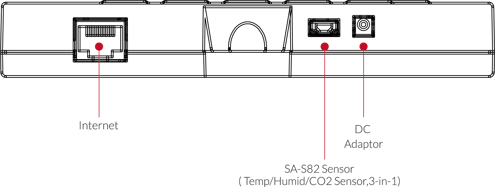
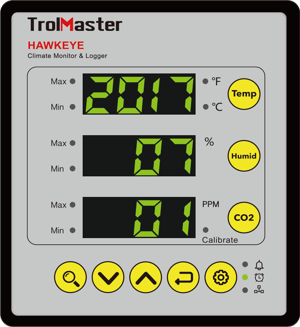
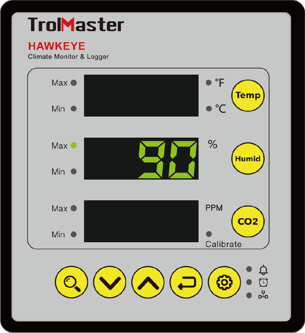
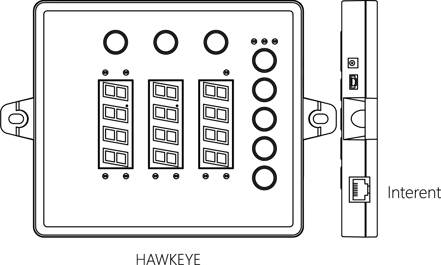
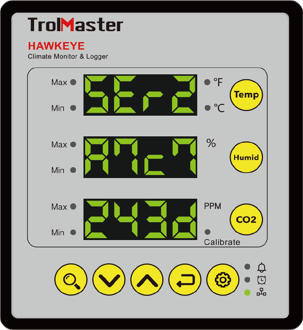
The front panel of the unit consists of three main LED screens for the display of temperature, humidity and CO2 PPM status respectively. lt is easy to monitor your grow room by setting the max/min setpoint of temperature, humidity and CO2 you desire. The built-in alarm will ring when the actual measured value exceeds the setting range. Also, it features a connection to your network to use our TrolMaster app for your Android,iOS smartphone or tablet, you can monitor the environment of your grow room anytime and anywhere and have warnings sent to your phone if the growing environment exceeds your max/min setpoint. The three-in-one remote Sensor with 16 feet long cable is placed in grow room to sense the growing environment while the HAWKEYE Monitor can be positioned outside for easy reading and monitoring.

### **PRECAUTIONS**
- Never exceed recommended amperage.
- Verify power source prior to connecting unit to power source.
- Make sure unit is securely mounted.
- Do not mount unit near heat generating sources.
- This unit shall not be exposed to dripping, splashing or spraying of liquids, protect unit from vapors, foggers etc.
- Clean unit with clean dry cloth, no oils or solvents.
- Protect any power cords from being walked on, pinched or crushed.
- Unit is designed for indoor use only.
- Unit is to be used within defined environmental parameters.
- Use caution when operating in high humidity environments.
- This unit contains no user-serviceable parts. Do not attempt servicing this product.
- Verify that all equipment connected to unit is of proper voltage
### **COMPONENTS**
**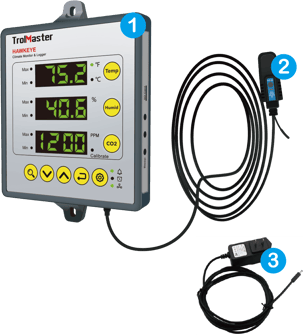**
1. Climate Monitor & Logger
2. SA-S82 Sensor
3. DC Adaptor
### **SPECIFICATIONS**
### **START** **SETTING**
- Once you have connected all of the components to the unit, we can start using the HAWKEYE Climate Monitor.
- Connect the plug-in power supply to the power connector on the lower right-hand side.The HAWKEYE Climate Monitor will turn on and boot up.
### **TIME SETTINGS**
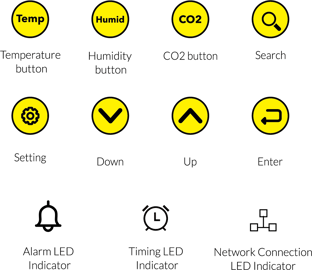
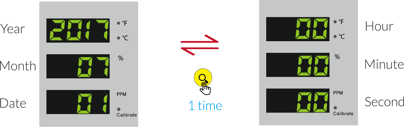
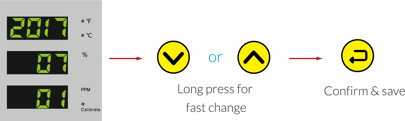
Press the **Setting** button for two times, the Clock LED indicator will blink and the Temperature LED displays 2017 (Year), Humidity LED displays 07 (Month) and the CO2 LED displays 01 (Date). Press the **Search** button for one time to convert into Hour-Minute-Second state. The Temperature LED displays 00 (Hour), Humidity LED displays 00 (Minute) and the CO2 LED displays 00 (Second). Press the **Search** button again and back to the Year-Month-Date state. Press **UP** or **DOWN**, the YEAR in the Temperature LED will be flashing. Press again **UP** or **DOWN** for year change. Long press for faster change. Finally, press **ENTER** button for save. Then the MONTH digits in the Humid LED will be flashing. Press **UP** or **DOWN** to adjust the value. Press **ENTER** for save. Same method to adjust the Date and Time adjustment.

### **READING MAX/MIN VALUE**
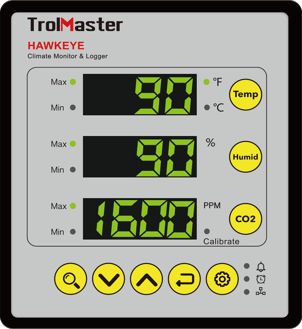
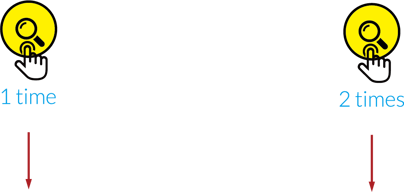
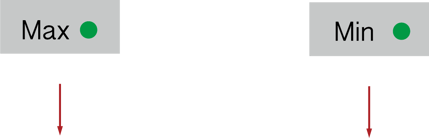
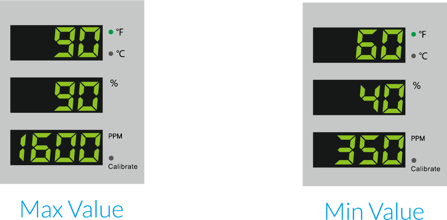
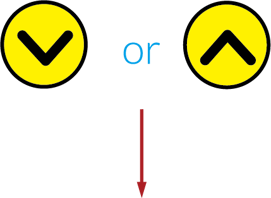
Press magnifying glass button for one time, all Max LED indicators will be flashing. All LED screens will display the recorded maximum value. Press magnifying glass button for two times, all Min LED indicators will be flashing. All LED screen will display the recorded minimum value. While in the Max or Min status, press **UP** or **DOWN** to enter the clear record function. All LED screens will be flashing, press **ENTER** and hold 3 seconds to clear the records.

### **TEMPALARM RANGE SETTINGS**
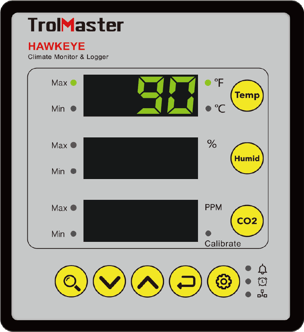
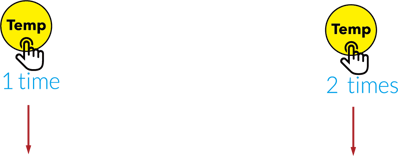
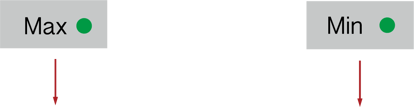
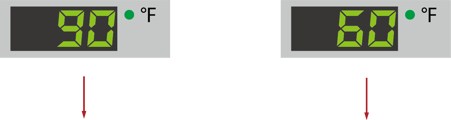
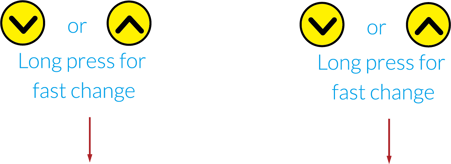
Press the **Temp** button for one time, the Max LED indicator will blink.The LED displays the maxvalue.Press **Up** or **DOWN** and the digits on the temperature screen will be flashing. Press again **Up** or **DOWN** for temperature change. Long press **UP** or **DOWN** for fast change. Press **Enter** for save and the LED display shows the changed value. Press the **Temp** button for two times, the Min LED indicator will blink. The LED displays the min value. Press **Up** or **DOWN** and the digits on the temperature screen will be flashing. Press again **Up** or **DOWN** for temperature change. Long press **Up** or **DOWN** button for fast change. Press **Enter** for save and the LED display shows the changed value.
### **HUMIDITY ALARM RANGE SETTINGS**
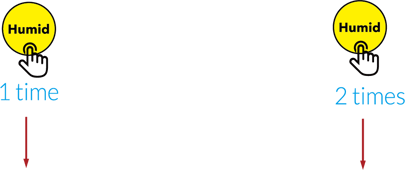
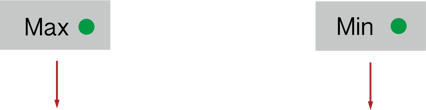
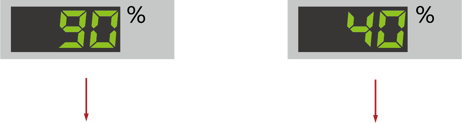
Press the **Humid** button for one time, the Max LED indicator will blink. The LED displays the max value. Press **UP** or **DOWN** and the digits on the humidity screen will be flashing. Press again **Up** or **DOWN** for humidity change. Long press **Up** or **DOWN** for fast change. Press **Enter** for save and the LED display shows the changed value. Press the **Humid** button for two times, the Min LED indicator will blink. The LED displays the min value. Press **Up** or **DOWN** and the digits on the humidity screen will be flashing. Press again **UP** or **DOWN** for humidity change. Longpress **Up** or **DOWN** button for fast change. Press **Enter** for save and the LED display shows the changed value.
### **CO2 ALARM RANGE SETTINGS**
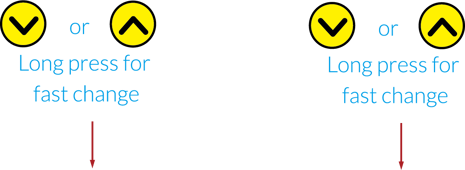
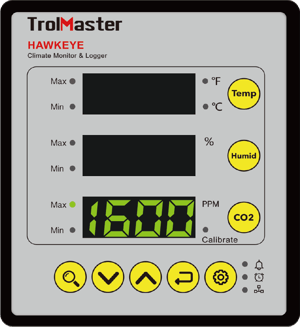
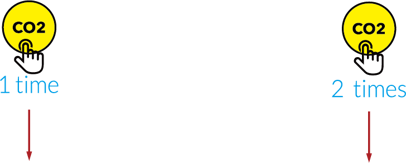
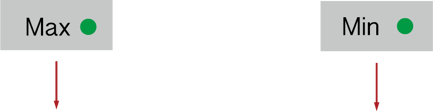
Press the **CO2** button for one time, the Max LED indicator will blink. The LED displays the max value. Press **Up** or **DOWN** and the digits on the CO2 screen will be flashing. Press again **UP** or **DOWN** for CO2 PPM change. Long press **Up** or **DOWN** for fast change. Press **Enter** for save and the LED display shows the changed value. Press the **CO2** button for two times, the Min LED indicator will blink. The LED displays the min value. Press **Up** or **DOWN** and the digits on the CO2 screen will be flashing. Press again **Up** or **DOWN** for CO2 PPM change. Long press **Up** or **DOWN** button for fast change. Press **Enter** for save and the LED display shows the changed value.
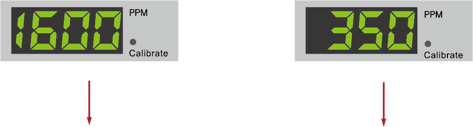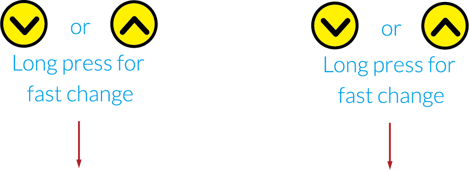
### **FAHRENHEIT & CELSIUS CONVERSION**
**Fahrenheit & Celsius conversion**
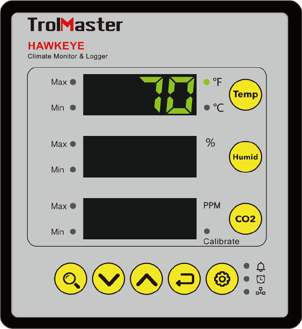
Factory default is based on Fahrenheit ° F and the LED indicator turns on. Press **Temp** button for 3 times, the LED indicator will be flashing, press **Up** or **DOWN** for Fahrenheit and Celsius conversion. The Celsius LED indicator will be flashing, the temperature unit will be changed into Celsiuse. Press **Enter** button within 5 seconds for confirmationand save.
### **CO2 PPM CALIBRATION**
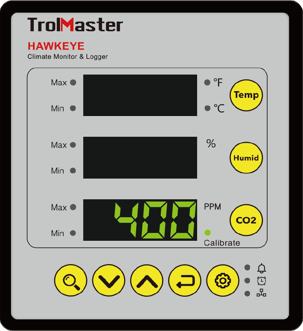
Press CO2 button for three times, the Calibrate LED indicator turns on and the LED will display 400. Press **UP** or **DOWN** ,the digits 400 will be flashing at the same time. Press **UP** or **DOWN** to adjut the calibration level if you have an accurate reference. Otherwise, the recommended level will be 400. Press **Enter** button and the Calibrate LED indicato will be flashing. The calibration process begins and it takes 90 seconds. The first 60 seconds for preheating and later 30 seconds for average. The LED will display the current value automatically after completion of the calibration process. During the calibration, place the sensor in an open area. Far away from people, animals and biogas etc.
### **ALARM SETTING**
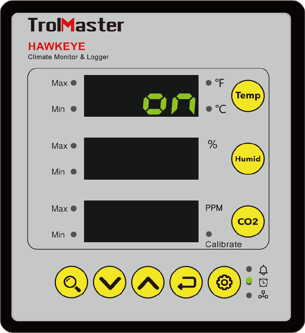
The factory default of the beeper is set to ON and the Alarm LED indicator turns on. Press the **Setting** button for one time, the Alarm LED indicator will be flashing. The temperature LED displays ON while the humidity LED and CO2 LED will turn off. Press **UP** or **DOWN** ,the temperature LED displays ON and flashing. Press **UP** or **DOWN** the temperature LED displays OFF and flashing. Press **Enter** button to confirm and save the change.
### **SMARTPHONE APP CONTROL**
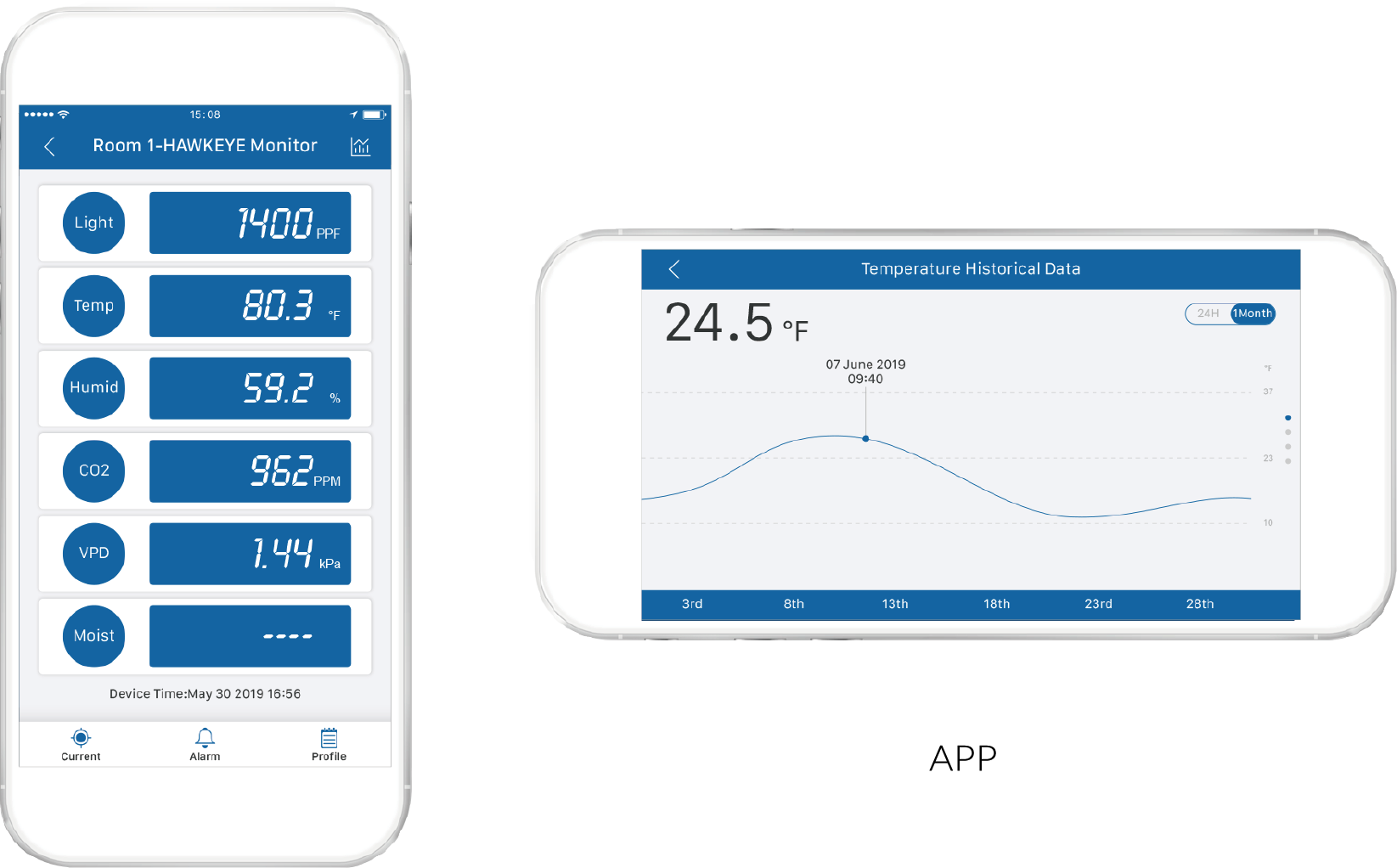
Download app to remotely monitor the temperature, humidity and CO2 levels and review all the historical data and chart.
### **READING SERIALNUMBER**
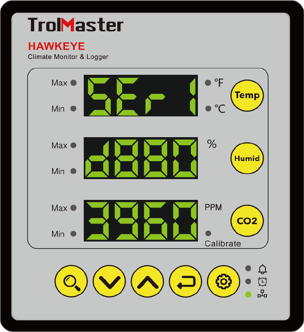
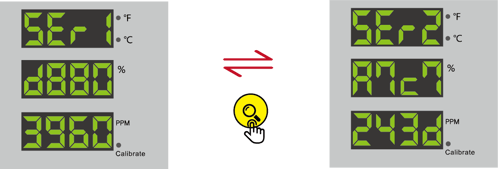
In normal display state, press **Setting** button for three times, the Network Connection LED indicator, will be flashing and the LED screen displays the former 8 digits of serial number (SEr1...). Press **Search** button to display the latter 8 digits of serial number (SEr2............................................ ) accordingly. There aretotal 16 digits for the serial number, for example “D880 3960 A7C7 243D". The Network Connection LED indicator, will turn on when connected the unit with loT SPl-45Amz Ethernet Adpapter or smartphone module.
### **RESTORE FACTORY SETTING**
To restore the factory setting, press and hold **Setting** button before plugging the HAWKEYE Monitor into wall outlet. After power-on, the LED screen shows “RESET SETTING" and all the LED indicators will be flashig together. Keep pressing **Setting** button for more than 5 seconds, all setting parameters will restore to factory default setting except for temperature unit and CO2 calibration value. When reset setting is completed, the LED will show “RESET DONE" and then turn back to normal display. lf you do not press the Setting button within 5 seconds, the unit will not restore factory setting and back to normal display directly.
### **MICROSD DATA LOGGING**
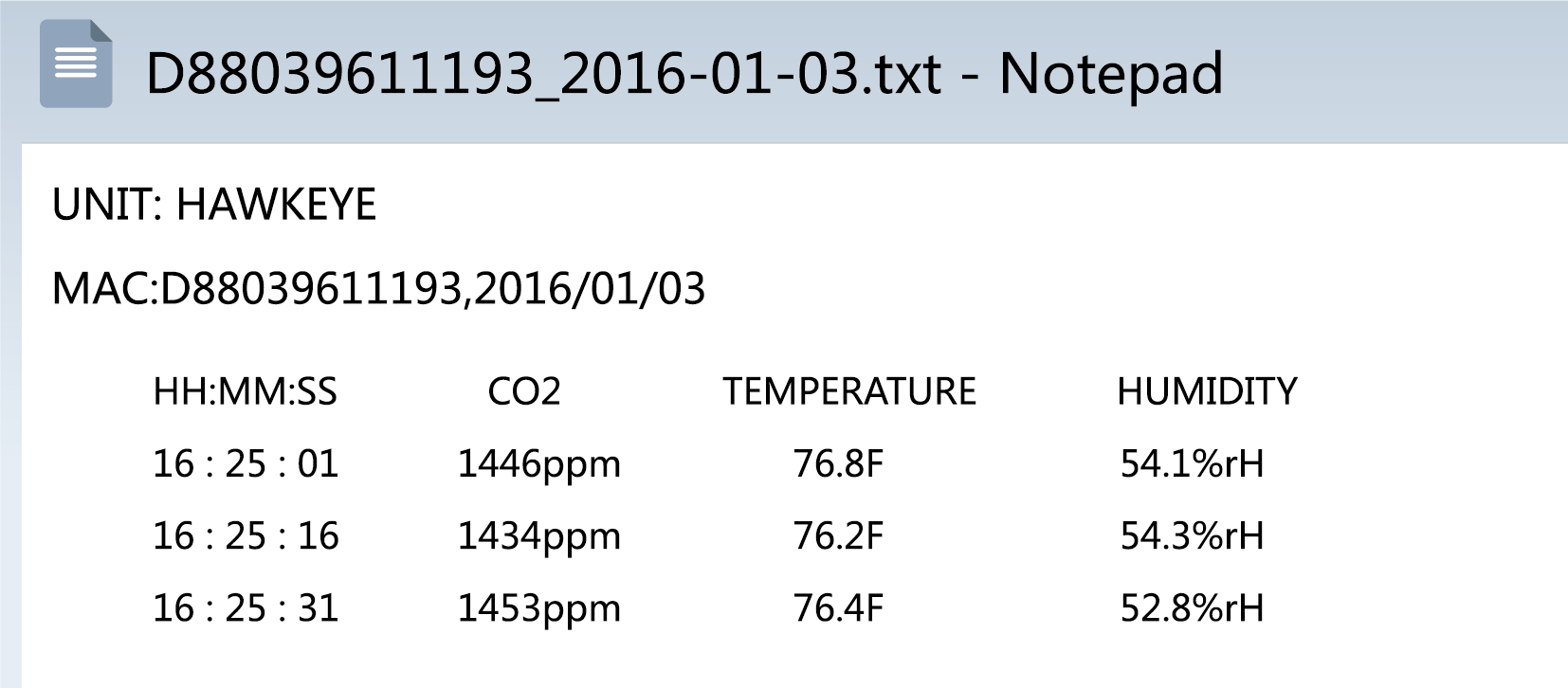
Insert MicroSD card (maximum capacity 128G), the unit will record the current temperature value, humidity value and CO2 value auotomatically. Save records every 15 seconds for one time in the format “MAC address+date.txt" under the folder HAWKEYE.

Save in a txt file for one day. For example:
Note: hot-plug is not permitted for the MicroSD card, otherwise it will damage the files in the MicroSD card.
### **LED DIMMING FUNCTION**
The LED display will be dimmed if the device has stayed inactive for one minute. The factory setting of LED dimming function will be ON. Press and hold **ENTER** for 2 seconds to turn on or turn off this function.
### **FACTORY DEFAULT SETTING**
**Remarks:** \*lf the setting Min value is 50, then the Max value must be 55 or above, vice versa.
### **WARRANTY**
TrolMaster only use high quality cornponents. Under normal operating conditions, the HAWKEYE Climate Monitor are covered by a three-year warranty from the original date of purchase. For service, return the HAWKEYE Climate Monitor in the original packaging to your shop with the original sale receipt. Components that are excluded from warranty are components that have failed due to abnorral usage.
In the case of defects of the HAWKEYE Climate Monitor, the Monitor will either be replaced or repaired using new or reconditioned products or parts. lf the Monitor will be replaced this limited warranty shall apply to the replacement product for the remaining initial warranty period, i.e. (three) 3 years from the date of purchase of the original product.
### **RETURN**
All returns need to be done in the original packaging in order to avoid damages of the product during the transport. Defective products need to be returned to your local store for replacement or repair. No-professionals DO not open the cabinet to prevent electric shock or damage to the equipment.
### **TROUBLESHOOTING**
Some of the most common issues or problems can be found within this section. Before returning the unit for service, please consult the troubleshooting points below.
### WARNING
DO NOT allow the HAWKEYE Climate Monitor to be exposed to water or excessive heat.
DO NOT open or attempt to repair or disassemble the Monitor , as there are no user-serviceable parts inside. Opening the Monitor will void the warranty.
If the HAWKEYE Climate Monitor is dirty, wipe it with a dry towel. The HAWKEYE operates under natural ventilation conditions.
For any issues or concerns with our products, DO NOT return them to the store. Please contact our tech support department at [support@trolmaster.eu](mailto:support@trolmaster.com)
Here you will find the Manual for the Hawkeye, **[Link](https://kb.trolmaster.com/hubfs/TM_TG_ALL_MANUALS/User+Manual+-+CM-1.pdf?hsLang=en)**
Here you will find the Tech Sheet for the Hawkeye, **[Link](https://kb.trolmaster.com/hubfs/TM_TG_ALL_TECHSHEET/CM-1+Tech+Sheet.pdf?hsLang=en)**
- [FAQ + Troubleshooting](https://kb.trolmaster.com/faq-troubleshooting?hsLang=en#main-content)
- [Calibration](https://kb.trolmaster.com/faq-troubleshooting?hsLang=en#calibration)
- [Setpoints](https://kb.trolmaster.com/faq-troubleshooting?hsLang=en#setpoints)
- [Firmware](https://kb.trolmaster.com/faq-troubleshooting?hsLang=en#firmware)
- [FAQ](https://kb.trolmaster.com/faq-troubleshooting?hsLang=en#faq)
- [Troubleshooting](https://kb.trolmaster.com/faq-troubleshooting?hsLang=en#troubleshooting)
- [General Information](https://kb.trolmaster.com/general-information?hsLang=en#main-content)
- [Controllers](https://kb.trolmaster.com/general-information?hsLang=en#controllers)
- [Reset Password](https://kb.trolmaster.com/general-information?hsLang=en#reset-password)
- [API](https://kb.trolmaster.com/general-information?hsLang=en#api)
- [TrolMaster Controllers](https://kb.trolmaster.com/trolmaster-controllers?hsLang=en#main-content)
- [Tent-X Controller (TCS-1)](https://kb.trolmaster.com/trolmaster-controllers?hsLang=en#tent-x-controller-tcs-1)
- [Green-X Controller (GCS-1)](https://kb.trolmaster.com/trolmaster-controllers?hsLang=en#green-x-controller-gcs-1)
- [Hydro-X Controller (HCS-1)](https://kb.trolmaster.com/trolmaster-controllers?hsLang=en#hydro-x-controller-hcs-1)
- [Hydro-X Pro Controller (HCS-2)](https://kb.trolmaster.com/trolmaster-controllers?hsLang=en#hydro-x-pro-controller-hcs-2)
- [Hydro-X Plus Controller (HCS-3)](https://kb.trolmaster.com/trolmaster-controllers?hsLang=en#hydro-x-plus-controller-hcs-3)
- [Aqua-X Controller (NFS-1)](https://kb.trolmaster.com/trolmaster-controllers?hsLang=en#aqua-x-controller-nfs-1)
- [Aqua-X Pro Controller (NFS-2)](https://kb.trolmaster.com/trolmaster-controllers?hsLang=en#aqua-x-pro-controller-nfs-2)
- [Aqua-X Plus Controller (NFS-3)](https://kb.trolmaster.com/trolmaster-controllers?hsLang=en#aqua-x-plus-controller-nfs-3)
- [Carbon-X Controller (CDA-1)](https://kb.trolmaster.com/trolmaster-controllers?hsLang=en#carbon-x-controller-cda-1)
- [Single Task Controllers](https://kb.trolmaster.com/trolmaster-controllers?hsLang=en#single-task-controllers)
- [ThinkGrow LED Lamps](https://kb.trolmaster.com/thinkgrow-led-lamps?hsLang=en#main-content)
- [Model-H Plus LED Light (4', 5')](https://kb.trolmaster.com/thinkgrow-led-lamps?hsLang=en#model-h-plus-led-light-4-5)
- [Model-I Plus Horticulture LED Light](https://kb.trolmaster.com/thinkgrow-led-lamps?hsLang=en#model-i-plus-horticulture-led-light)
- [Model-I Horticulture LED Light](https://kb.trolmaster.com/thinkgrow-led-lamps?hsLang=en#model-i-horticulture-led-light)
- [Model One LED Driver (TLD-2, TLD-4)](https://kb.trolmaster.com/thinkgrow-led-lamps?hsLang=en#model-one-led-driver-tld-2-tld-4)
- [Model One LED Bar (TLD-1, TLD-2, TLD-3, DR-1, FR-1)](https://kb.trolmaster.com/thinkgrow-led-lamps?hsLang=en#model-one-led-bar-tld-1-tld-2-tld-3-dr-1-fr-1)
- [Inner-Canopy LED Bar (ICL-120, ICL-150, ICL-300)](https://kb.trolmaster.com/thinkgrow-led-lamps?hsLang=en#inner-canopy-led-bar-icl-120-icl-150-icl-300)
- [Model-C Clone LED Light](https://kb.trolmaster.com/thinkgrow-led-lamps?hsLang=en#model-c-clone-led-light)
- [LED Light multibar (Model-H, Model-W, Model-V)](https://kb.trolmaster.com/thinkgrow-led-lamps?hsLang=en#led-light-multibar-model-h-model-w-model-v)
- [Aero-Fan Ventilation](https://kb.trolmaster.com/aero-fan-ventilation?hsLang=en#main-content)
- [Smart Fan Remote (FRC-1, FRC-2)](https://kb.trolmaster.com/aero-fan-ventilation?hsLang=en#smart-fan-remote-frc-1-frc-2)
- [6" (150mm) Inline Duct Ventilation Fan (V-6)](https://kb.trolmaster.com/aero-fan-ventilation?hsLang=en#6-150mm-inline-duct-ventilation-fan-v-6)
- [8" (200mm) Inline Duct Ventilation Fan (V-8)](https://kb.trolmaster.com/aero-fan-ventilation?hsLang=en#8-200mm-inline-duct-ventilation-fan-v-8)
- [10" (250mm) Inline Duct Ventilation Fan (V-10)](https://kb.trolmaster.com/aero-fan-ventilation?hsLang=en#10-250mm-inline-duct-ventilation-fan-v-10)
- [12" (315mm) Inline Duct Ventilation Fan (V-12)](https://kb.trolmaster.com/aero-fan-ventilation?hsLang=en#12-315mm-inline-duct-ventilation-fan-v-12)
- [10" (250mm) Metall Inline Duct Ventilation Fan (V-10M)](https://kb.trolmaster.com/aero-fan-ventilation?hsLang=en#10-250mm-metall-inline-duct-ventilation-fan-v-10m)
- [12" (300mm) Metall Inline Duct Ventilation Fan (V-12M)](https://kb.trolmaster.com/aero-fan-ventilation?hsLang=en#12-300mm-metall-inline-duct-ventilation-fan-v-12m)
- [20" (500mm) High Velocity Fan (HE-20)](https://kb.trolmaster.com/aero-fan-ventilation?hsLang=en#20-500mm-high-velocity-fan-he-20)
- [20" (500mm) High Velocity Fan Pro Model (HE-20M)](https://kb.trolmaster.com/aero-fan-ventilation?hsLang=en#20-500mm-high-velocity-fan-pro-model-he-20m)
- [Accessories](https://kb.trolmaster.com/aero-fan-ventilation?hsLang=en#accessories)
- [Climate Sensors and Medium Sensors](https://kb.trolmaster.com/climate-sensors-and-medium-sensors?hsLang=en#main-content)
- [4-in-1 Sensor Temp/Humid/CO2/Light on-off (MBS-PRO)](https://kb.trolmaster.com/climate-sensors-and-medium-sensors?hsLang=en#4-in-1-sensor-temp-humid-co2-light-on-off-mbs-pro)
- [3-in-1 Temp/Humid/Light On/Off Sensor (MBS-TH)](https://kb.trolmaster.com/climate-sensors-and-medium-sensors?hsLang=en#3-in-1-temp-humid-light-on-off-sensor-mbs-th)
- [Full Spectrum Quantum Sensor (MBS-PAR)](https://kb.trolmaster.com/climate-sensors-and-medium-sensors?hsLang=en#full-spectrum-quantum-sensor-mbs-par)
- [3-in-1 Water Content Sensor (WCS-2)](https://kb.trolmaster.com/climate-sensors-and-medium-sensors?hsLang=en#3-in-1-water-content-sensor-wcs-2)
- [Water Content Sensor 3 (WCS-3)](https://kb.trolmaster.com/climate-sensors-and-medium-sensors?hsLang=en#water-content-sensor-3-wcs-3)
- [CO2 Sensor (MBS-S8)](https://kb.trolmaster.com/climate-sensors-and-medium-sensors?hsLang=en#co2-sensor-mbs-s8)
- [CO2 Sensor for Carbon-X (MBS-K30)](https://kb.trolmaster.com/climate-sensors-and-medium-sensors?hsLang=en#co2-sensor-for-carbon-x-mbs-k30)
- [Smoke Detector (MBS-SD)](https://kb.trolmaster.com/climate-sensors-and-medium-sensors?hsLang=en#smoke-detector-mbs-sd)
- [4-in-1 Sensor for Green-X Controller (MBS-GH)](https://kb.trolmaster.com/climate-sensors-and-medium-sensors?hsLang=en#4-in-1-sensor-for-green-x-controller-mbs-gh)
- [Weather Station Sensor (MBS-WS)](https://kb.trolmaster.com/climate-sensors-and-medium-sensors?hsLang=en#weather-station-sensor-mbs-ws)
- [Weather Station Splitter (WSP-1)](https://kb.trolmaster.com/climate-sensors-and-medium-sensors?hsLang=en#weather-station-splitter-wsp-1)
- [Water and Nutrient Sensors](https://kb.trolmaster.com/water-and-nutrient-sensors?hsLang=en#main-content)
- [Inline/Reservoir EC/Temp Sensors (PCT-1, PCT-2, PCT-3)](https://kb.trolmaster.com/water-and-nutrient-sensors?hsLang=en#inline-reservoir-ec-temp-sensors-pct-1-pct-2-pct-3)
- [Inline/Reservoir pH Sensor (PPH-1, PPH-2, PPH-3)](https://kb.trolmaster.com/water-and-nutrient-sensors?hsLang=en#inline-reservoir-ph-sensor-pph-1-pph-2-pph-3)
- [Sensor Boards for pH and EC Sensors (AMP-2, AMP-3)](https://kb.trolmaster.com/water-and-nutrient-sensors?hsLang=en#sensor-boards-for-ph-and-ec-sensors-amp-2-amp-3)
- [Substrate Sensor Set for VWC, EC & Temp (WCS-9)](https://kb.trolmaster.com/water-and-nutrient-sensors?hsLang=en#substrate-sensor-set-for-vwc-ec-temp-wcs-9)
- [Substrate Sensor Node (WN-9)](https://kb.trolmaster.com/water-and-nutrient-sensors?hsLang=en#substrate-sensor-node-wn-9)
- [Water Detector (WD-1)](https://kb.trolmaster.com/water-and-nutrient-sensors?hsLang=en#water-detector-wd-1)
- [Device Stations and Adapters](https://kb.trolmaster.com/device-stations-and-adapters?hsLang=en#main-content)
- [EC Fan Control Adapter (EFC-1)](https://kb.trolmaster.com/device-stations-and-adapters?hsLang=en#ec-fan-control-adapter-efc-1)
- [AC Remote Station (ARS-1)](https://kb.trolmaster.com/device-stations-and-adapters?hsLang=en#ac-remote-station-ars-1)
- [Temperature Device Station (DST-1, DST-2)](https://kb.trolmaster.com/device-stations-and-adapters?hsLang=en#temperature-device-station-dst-1-dst-2)
- [Thermostat Station (TS-1)](https://kb.trolmaster.com/device-stations-and-adapters?hsLang=en#thermostat-station-ts-1)
- [Thermostat Station (TS-2)](https://kb.trolmaster.com/device-stations-and-adapters?hsLang=en#thermostat-station-ts-2)
- [Reheat Station (TS-3)](https://kb.trolmaster.com/device-stations-and-adapters?hsLang=en#reheat-station-ts-3)
- [Humidity Device Station (DSH-1, DSH-2)](https://kb.trolmaster.com/device-stations-and-adapters?hsLang=en#humidity-device-station-dsh-1-dsh-2)
- [Humidistat Station (HS-1)](https://kb.trolmaster.com/device-stations-and-adapters?hsLang=en#humidistat-station-hs-1)
- [CO2 Device Station (DSC-1, DSC-2)](https://kb.trolmaster.com/device-stations-and-adapters?hsLang=en#co2-device-station-dsc-1-dsc-2)
- [Program Device Station (DSP-1, DSP-2)](https://kb.trolmaster.com/device-stations-and-adapters?hsLang=en#program-device-station-dsp-1-dsp-2)
- [Device Station Kit (4RS-2)](https://kb.trolmaster.com/device-stations-and-adapters?hsLang=en#device-station-kit-4rs-2)
- [Expander Station 4 (4RS-1)](https://kb.trolmaster.com/device-stations-and-adapters?hsLang=en#expander-station-4-4rs-1)
- [Dual Condition Adapters (DCC-1, DCC-2)](https://kb.trolmaster.com/device-stations-and-adapters?hsLang=en#dual-condition-adapters-dcc-1-dcc-2)
- [Dry Contact Board (OM-8)](https://kb.trolmaster.com/device-stations-and-adapters?hsLang=en#dry-contact-board-om-8)
- [Dry Contact Stations (DSD-1, DSD-2, DSD-3)](https://kb.trolmaster.com/device-stations-and-adapters?hsLang=en#dry-contact-stations-dsd-1-dsd-2-dsd-3)
- [Low-Volt Station (DSV-1, DSV-2)](https://kb.trolmaster.com/device-stations-and-adapters?hsLang=en#low-volt-station-dsv-1-dsv-2)
- [Motor Control Dry Contact Station (RMC-1)](https://kb.trolmaster.com/device-stations-and-adapters?hsLang=en#motor-control-dry-contact-station-rmc-1)
- [VFD Station for VFD Fan Speed Control (VFD-1)](https://kb.trolmaster.com/device-stations-and-adapters?hsLang=en#vfd-station-for-vfd-fan-speed-control-vfd-1)
- [Variable Frequency Drive for AC Motors Speed Controls (Delta-1)](https://kb.trolmaster.com/device-stations-and-adapters?hsLang=en#variable-frequency-drive-for-ac-motors-speed-controls-delta-1)
- [AC Remote Station (ARS-2)](https://kb.trolmaster.com/device-stations-and-adapters?hsLang=en#ac-remote-station-ars-2)
- [25Amps Relay Device Station (DSR-1)](https://kb.trolmaster.com/device-stations-and-adapters?hsLang=en#25amps-relay-device-station-dsr-1)
- [Single/Three Phase Curtain Motor Controller (AMC-1)](https://kb.trolmaster.com/device-stations-and-adapters?hsLang=en#single-three-phase-curtain-motor-controller-amc-1)
- [24V DC Greenhouse Roll Up Motor Controller (DMC-1)](https://kb.trolmaster.com/device-stations-and-adapters?hsLang=en#24v-dc-greenhouse-roll-up-motor-controller-dmc-1)
- [Control Boards and Flow Meters](https://kb.trolmaster.com/control-boards-and-flow-meters?hsLang=en#main-content)
- [6 Output 24V Control Board (OA6-24)](https://kb.trolmaster.com/control-boards-and-flow-meters?hsLang=en#6-output-24v-control-board-oa6-24)
- [6 Output 110V Control Board (OA6-110)](https://kb.trolmaster.com/control-boards-and-flow-meters?hsLang=en#6-output-110v-control-board-oa6-110)
- [12 Outputs 24V Control Board (OAT-24)](https://kb.trolmaster.com/control-boards-and-flow-meters?hsLang=en#12-outputs-24v-control-board-oat-24)
- [1" Digital Flow Meter (DFM-1)](https://kb.trolmaster.com/control-boards-and-flow-meters?hsLang=en#1-digital-flow-meter-dfm-1)
- [1.25" Digital Flow Meter (DFM-2)](https://kb.trolmaster.com/control-boards-and-flow-meters?hsLang=en#1-25-digital-flow-meter-dfm-2)
- [1.5" Digital Flow Meter (DFM-3)](https://kb.trolmaster.com/control-boards-and-flow-meters?hsLang=en#1-5-digital-flow-meter-dfm-3)
- [Lighting Control](https://kb.trolmaster.com/lighting-control?hsLang=en#main-content)
- [Light Adapter ThinkGrow (LMA-T)](https://kb.trolmaster.com/lighting-control?hsLang=en#light-adapter-thinkgrow-lma-t)
- [Light Adapter Group Control (LMA-G)](https://kb.trolmaster.com/lighting-control?hsLang=en#light-adapter-group-control-lma-g)
- [Light Adapter to Convert 0-10V Signals to Digital Signals to Control ThinkGrow LEDs (LMA-9)](https://kb.trolmaster.com/lighting-control?hsLang=en#light-adapter-to-convert-0-10v-signals-to-digital-signals-to-control-thinkgrow-leds-lma-9)
- [Light Adapter 0-10V (LMA-14)](https://kb.trolmaster.com/lighting-control?hsLang=en#light-adapter-0-10v-lma-14)
- [Group Control Adapter for 0-10V Protocol (LMA-14G)](https://kb.trolmaster.com/lighting-control?hsLang=en#group-control-adapter-for-0-10v-protocol-lma-14g)
- [Light Adapter Lantern Schedule (LMA-24)](https://kb.trolmaster.com/lighting-control?hsLang=en#light-adapter-lantern-schedule-lma-24)
- [Light Adapter Phantom (LMA-11)](https://kb.trolmaster.com/lighting-control?hsLang=en#light-adapter-phantom-lma-11)
- [Light Adapter Dimlux (LMA-12)](https://kb.trolmaster.com/lighting-control?hsLang=en#light-adapter-dimlux-lma-12)
- [Light Adapter SunSystem (LMA-13)](https://kb.trolmaster.com/lighting-control?hsLang=en#light-adapter-sunsystem-lma-13)
- [Light Adapter Dutch Lighting Innovations (LMA-15)](https://kb.trolmaster.com/lighting-control?hsLang=en#light-adapter-dutch-lighting-innovations-lma-15)
- [ThinkGrow Cable Management System](https://kb.trolmaster.com/thinkgrow-cable-management-system?hsLang=en#main-content)
- [Daisy Chain Power Cord System (DCA-10, DCA-12, DCA-14, DEA-10L, DEA-10, DEA-12, DEA-14)](https://kb.trolmaster.com/thinkgrow-cable-management-system?hsLang=en#daisy-chain-power-cord-system-dca-10-dca-12-dca-14-dea-10l-dea-10-dea-12-dea-14)
- [Cable Management Model One LED System (TDC-1, TDC-2, TDC-3, TDC-4, TDC-120, TDC-240, TDC-240E)](https://kb.trolmaster.com/thinkgrow-cable-management-system?hsLang=en#cable-management-model-one-led-system-tdc-1-tdc-2-tdc-3-tdc-4-tdc-120-tdc-240-tdc-240e)
- [Smart Junction Box (OPA-2)](https://kb.trolmaster.com/thinkgrow-cable-management-system?hsLang=en#smart-junction-box-opa-2)
- [ThinkGrow Accessoires](https://kb.trolmaster.com/thinkgrow-accessoires?hsLang=en#main-content)
- [Smart Light Lifter (LLT-1)](https://kb.trolmaster.com/thinkgrow-accessoires?hsLang=en#smart-light-lifter-llt-1)
- [Smart Light Lifter (LLT-2)](https://kb.trolmaster.com/thinkgrow-accessoires?hsLang=en#smart-light-lifter-llt-2)
- [Smart Light Lifter (LLT-3)](https://kb.trolmaster.com/thinkgrow-accessoires?hsLang=en#smart-light-lifter-llt-3)
- [Smart Lifter Remote (LRC-1)](https://kb.trolmaster.com/thinkgrow-accessoires?hsLang=en#smart-lifter-remote-lrc-1)
- [Vertical LED Stands for Inner-Canopy Lamps](https://kb.trolmaster.com/thinkgrow-accessoires?hsLang=en#vertical-led-stands-for-inner-canopy-lamps)
- [Lifter Rigging Cable Kit (RC-1)](https://kb.trolmaster.com/thinkgrow-accessoires?hsLang=en#lifter-rigging-cable-kit-rc-1)
- [Unitstrut Hanger for Model-H/H Plus/W/V (UH-1) and Model-I/I Plus (UH-2)](https://kb.trolmaster.com/thinkgrow-accessoires?hsLang=en#unitstrut-hanger-for-model-h-h-plus-w-v-uh-1-and-model-i-i-plus-uh-2)
- [Alarm Station](https://kb.trolmaster.com/alarm-station?hsLang=en#main-content)
- [CO2 Alarm Station (AS-1)](https://kb.trolmaster.com/alarm-station?hsLang=en#co2-alarm-station-as-1)
- [CO2 Alarm Station, mixed color (AS-2)](https://kb.trolmaster.com/alarm-station?hsLang=en#co2-alarm-station-mixed-color-as-2)
- [CO2 Alarm Station, orange (AS-3)](https://kb.trolmaster.com/alarm-station?hsLang=en#co2-alarm-station-orange-as-3)
- [CO2 Alarm Station, blue (AS-4)](https://kb.trolmaster.com/alarm-station?hsLang=en#co2-alarm-station-blue-as-4)
- [CO2 Alarm Siren (AS-5)](https://kb.trolmaster.com/alarm-station?hsLang=en#co2-alarm-siren-as-5)
- [Cables and Connections](https://kb.trolmaster.com/cables-and-connections?hsLang=en#main-content)
- [RJ12 Extension Cable Set (ECS-1)](https://kb.trolmaster.com/cables-and-connections?hsLang=en#rj12-extension-cable-set-ecs-1)
- [RJ12 to 3 Pins IP67 Plug Cable Set (ECS-3)](https://kb.trolmaster.com/cables-and-connections?hsLang=en#rj12-to-3-pins-ip67-plug-cable-set-ecs-3)
- [4,9m Extension Cable for AMP-2 Sensor Board (ECS-4)](https://kb.trolmaster.com/cables-and-connections?hsLang=en#49m-extension-cable-for-amp-2-sensor-board-ecs-4)
- [RJ12 to PushLock Waterproof Connector Cable Set (ECS-5)](https://kb.trolmaster.com/cables-and-connections?hsLang=en#rj12-to-pushlock-waterproof-connector-cable-set-ecs-5)
- [4,9m 4-Pin Extension Cable (ECS-6)](https://kb.trolmaster.com/cables-and-connections?hsLang=en#49m-4-pin-extension-cable-ecs-6)
- [4-Pin 3,7m Daisy chain control cable (ECS-7)](https://kb.trolmaster.com/cables-and-connections?hsLang=en#4-pin-37m-daisy-chain-control-cable-ecs-7)
- [9,8m Extension Cable for IR Emitter (ECS-8)](https://kb.trolmaster.com/cables-and-connections?hsLang=en#98m-extension-cable-for-ir-emitter-ecs-8)
- [3,7m RJ12 to 4-Pin IP65 Connector Cable (ECS-9)](https://kb.trolmaster.com/cables-and-connections?hsLang=en#37m-rj12-to-4-pin-ip65-connector-cable-ecs-9)
- [7,6m RJ12 Coiled Communication Cable (ECS-10)](https://kb.trolmaster.com/cables-and-connections?hsLang=en#76m-rj12-coiled-communication-cable-ecs-10)
- [4-Pin Waterproof Splitter Cable (ECS-12)](https://kb.trolmaster.com/cables-and-connections?hsLang=en#4-pin-waterproof-splitter-cable-ecs-12)
- [Touch Spot Extension Cable (TSS-2)](https://kb.trolmaster.com/cables-and-connections?hsLang=en#touch-spot-extension-cable-tss-2)
- [150m RJ12 Cable Roll (ECS-500)](https://kb.trolmaster.com/cables-and-connections?hsLang=en#150m-rj12-cable-roll-ecs-500)
- [Multifunction Crimper (MC-1)](https://kb.trolmaster.com/cables-and-connections?hsLang=en#multifunction-crimper-mc-1)
- [Accessories](https://kb.trolmaster.com/accessories?hsLang=en#main-content)
- [RJ12 Splitter Hub (SPH-1)](https://kb.trolmaster.com/accessories?hsLang=en#rj12-splitter-hub-sph-1)
- [Grow Camera (TC-2, TC-1)](https://kb.trolmaster.com/accessories?hsLang=en#grow-camera-tc-2-tc-1)
- [Touch Spot Extpansion Set (TSS-1)](https://kb.trolmaster.com/accessories?hsLang=en#touch-spot-extpansion-set-tss-1)
- [RJ12 Waterproof Straight-Through Inline Coupler (2 Pieces) (ECW-1)](https://kb.trolmaster.com/accessories?hsLang=en#rj12-waterproof-straight-through-inline-coupler-2-pieces-ecw-1)
- [Sensor Bracket (2 Pieces) (TSB-1)](https://kb.trolmaster.com/accessories?hsLang=en#sensor-bracket-2-pieces-tsb-1)
- [Weatherproof Box (BM-1)](https://kb.trolmaster.com/accessories?hsLang=en#weatherproof-box-bm-1)
- [Cabinet (SCC-4)](https://kb.trolmaster.com/accessories?hsLang=en#cabinet-scc-4)
- Start
- Produkte
- Preise
- Blog
- Unternehmen
[](https://www.trolmaster.eu)
Copyright © 2025 TrolMaster